
Professional services automation (PSA) is software that connects resourcing, time tracking, budgeting, and billing so hours logged translate directly into invoices and profit, without anyone re-keying numbers between systems. It suits consultancies, agencies, IT services firms, and any professional practice billing for time or project outcomes. The global PSA market was valued around US$12.4 billion in 2024, and firms that implement it well typically recover both administrative hours and lost billing margin.
Table of Contents
- What is professional services automation, really?
- Core PSA components and must-have capabilities
- Benefits and realistic ROI of PSA for services firms
- How to evaluate and choose a PSA: a procurement checklist
- Implementing PSA: a phased rollout plan and common pitfalls
- When custom consolidation beats off-the-shelf PSA
- Industry-specific use cases and examples of PSA application
- Security and compliance considerations in PSA systems
- Future trends and innovations in PSA technology
- Choosing between custom and packaged PSA
- How AdaptAI approaches PSA for small and medium firms
- Sources
- FAQ
What is professional services automation, really?
Professional services automation is software that helps professionals manage project delivery, resource allocation, time tracking, and billing in one connected system instead of five disconnected ones. That's the textbook definition, and it's accurate as far as it goes. But the more useful way to understand PSA is by what it replaces: the spreadsheet a project manager keeps to track hours, the separate invoicing tool finance uses, the CRM sales lives in, and the sticky-note system somebody uses to remember who's free next week.
PSA gets confused with three other categories constantly, and the confusion costs buyers money when they pick the wrong tool.
Project management software (think generic task boards and Gantt charts) tracks what needs doing and by when. It rarely connects that work to a budget or a billing rate. You can finish a project on time in a PM tool and still have no idea whether it made money.
CRM manages the relationship before the contract is signed: leads, opportunities, deal stages. A good PSA needs to talk to your CRM, because a closed deal should trigger a staffed project automatically, but CRM alone tells you nothing about delivery cost or utilization.
ERP is the finance and operations backbone for the whole company, often built for manufacturing or retail logic, with general ledger, inventory, and procurement at its core. Professional services firms sometimes bolt PSA-like modules onto an ERP, but most ERPs weren't designed around billable hours as the core unit of value.
Core PSA modules typically include:
- Project and resource management, matching people's skills and availability to demand
- Time and expense tracking, linked to specific budget lines
- Financial management, covering invoicing, revenue recognition, and margin tracking
- Client-facing reporting and dashboards
TechTarget's framework groups these into project, resource, and financial management as the three pillars that give firms mid-project profitability visibility, not just a postmortem after the invoice goes out.
Most PSA today is cloud-based, sold as a subscription, and aimed at firms with anywhere from a handful of consultants to several hundred billable staff. On-premises PSA still exists in some larger, security-conscious organizations, but it's increasingly the exception rather than the rule.
Core PSA components and must-have capabilities
Not every tool that calls itself PSA actually behaves like one. A real PSA connects resourcing, time, budgets, and billing so an hour logged flows into profitability without anyone touching a spreadsheet, and integrations aren't optional here, they're a precondition. A task tracker with a timer bolted on doesn't qualify, no matter what the marketing page says.
Here's what separates a genuine PSA platform from a project tool wearing a PSA label:
- Resourcing and forecasting. Good resourcing shows you who's available next month, not just who's busy today. It should flag over-allocation before it happens and let you model "what if we win this deal" scenarios against current staff capacity.
- Time and expense tracking tied to budgets. An hour logged against a project should immediately show up against that project's remaining budget, not sit in a separate timesheet system waiting for someone to reconcile it manually at month-end.
- Budgeting, profitability tracking, and alerts. You want to see margin erosion while a project is still running, not three weeks after it's closed and the damage is done.
- Client reporting and live dashboards. Clients increasingly expect a shareable, real-time view of project status and spend, not a PDF emailed monthly.
- Integrations with CRM, accounting, and HR systems. This is where most so-called PSA tools quietly fail. If closing a deal in your CRM doesn't automatically spin up a staffed project, you're still doing manual handoffs.
- AI agents that operate on your actual data. This is the newest and most misunderstood category, covered below.
Pro Tip: During any vendor demo, ask them to show one thing: a deal closing in CRM, automatically creating a staffed project, with time flowing to a budget line and an invoice generating without a single CSV export. If they can't do it live, that gap will be your problem to solve manually every month.
On AI specifically, the meaningful capability is an agent that operates on your organization's own cost and delivery data, drafting a priced deliverable from your actual rate cards and past project history, not a generic chatbot answering questions about your software's help documentation. A demo chatbot that explains how to export a report is a feature. An agent that drafts a project plan and staffing recommendation based on your firm's real margins is a capability. Ask vendors to show the difference directly, because the marketing language for both often sounds identical.
Benefits and realistic ROI of PSA for services firms
PSA's return shows up in more than one place, and firms that only measure "hours saved on timesheets" usually undercount the actual payback. Teamwork's ROI framework describes the return across four categories: recovered time, recovered margin, recovered people, and protected margin as AI reshapes delivery costs.
The quickest, most measurable win usually comes from removing manual reporting and billing reconciliation — the two tasks that eat administrative hours every single week and are the easiest to benchmark before and after implementation, according to Teamwork's ROI analysis.
Recovered time is the obvious one: fewer hours spent building status reports by hand, chasing timesheets, or reconciling a CRM opportunity against a delivery spreadsheet.
Recovered margin is less obvious but often larger. When you can see profitability mid-project instead of after invoicing, you catch scope creep and under-billing while there's still time to correct course, rather than discovering the loss on a closed project report.
Recovered people address a quieter cost: burnout and turnover caused by manual admin work that skilled consultants shouldn't be doing in the first place. Every hour a senior consultant spends reconciling a spreadsheet is an hour they're not billing, and it's also an hour that erodes morale over time.
Protected margin is the newest lever, tied directly to how AI is changing the cost structure of delivery itself. As AI agents take on drafting and first-pass analysis work, the margin on a project depends increasingly on how well your systems capture and price that shift, not just on billable hours logged.
Realistic ROI drivers to model when building your business case:
- Reduction in hours spent on manual timesheet reconciliation and status reporting
- Improvement in utilization rates once resourcing visibility replaces guesswork
- Reduction in billing leakage (unbilled or under-billed hours) once time and invoicing are directly connected
- Faster invoice cycles once approvals and generation happen inside one system instead of across two or three
None of these numbers arrive automatically. They depend on adoption, data cleanliness, and whether the firm actually uses the resourcing and reporting features rather than just the timesheet.
How to evaluate and choose a PSA: a procurement checklist
Choosing PSA well means testing vendors against a short list of hard requirements, not scrolling through a features page. Teamwork's framework identifies five to six core requirements that separate genuine PSA from a rebranded task tracker, and they translate directly into demo tests.
- Test resourcing with a real scenario. Give the vendor a hypothetical deal and ask them to show staffing it against current team capacity, live, in the demo.
- Trace one hour from timer to invoice. Ask them to log a time entry and show it hit a budget line and appear on a draft invoice, without an export or manual step in between.
- Check profitability visibility mid-project. Ask to see a dashboard showing margin on an active, unfinished project, not just a closed-project report.
- Request a live, shareable client report. If the only option is a static PDF, that's a real limitation for client-facing teams.
- Demand the CRM-to-project handoff, live. Watch a closed deal in CRM automatically create a staffed project with time and budget already attached. This single test reveals more integration gaps than any spec sheet.
- Separate real AI agents from chatbots. Ask what data the AI actually operates on. If it can't reference your firm's own rate cards or past project margins, it's a support chatbot with a new label.
Beyond the demo itself, confirm these before signing anything:
- Data residency and encryption standards, especially if you handle client financial or health information
- Support SLA response times, in writing, not just in the sales deck
- Realistic implementation timeline, since vendors routinely underquote this
- Contract terms around data export if you ever need to leave, and what happens to historical time and billing records
Watch for a few red flags during procurement: vendors who won't do a live data-flow demo, contracts that lock historical data behind a paywall on exit, and pricing that balloons sharply once you add the integrations you actually need. Third-party comparison lists can help you build a shortlist, but platform fit depends heavily on your specific billing model and client base, so treat generic rankings as a starting point, not a verdict.
Implementing PSA: a phased rollout plan and common pitfalls
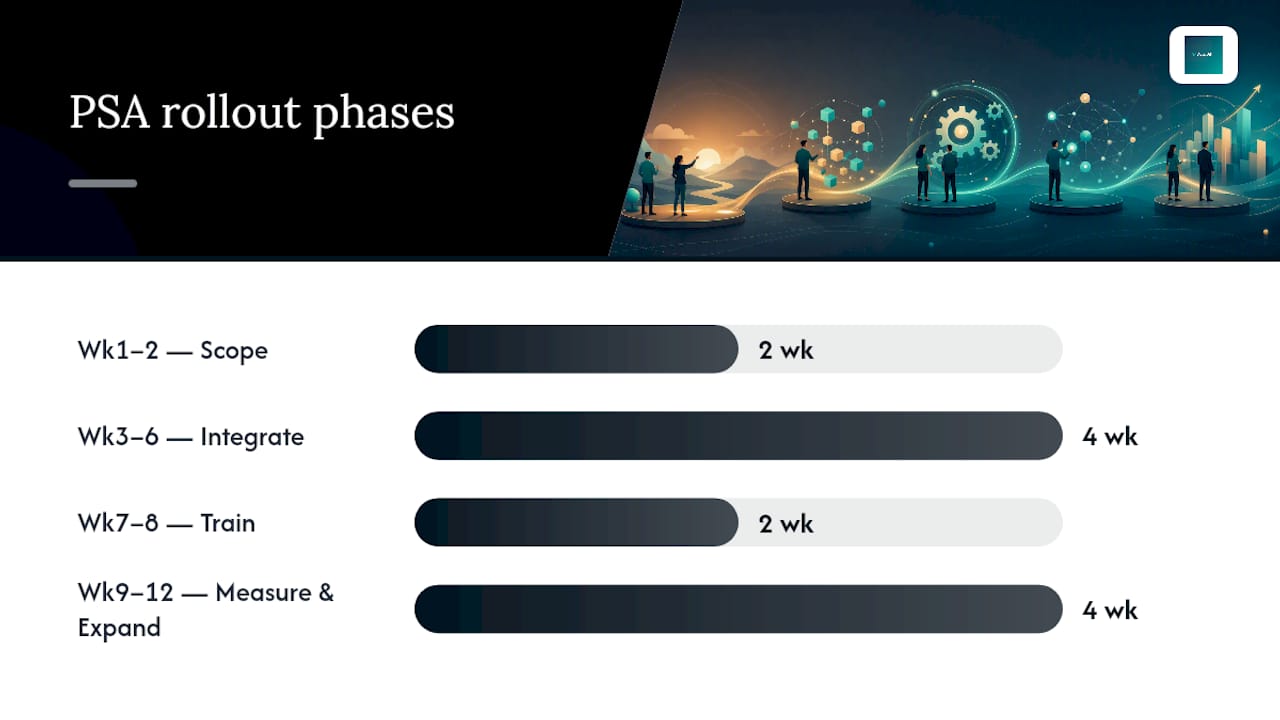
Start narrow. A pilot with one team, one clear goal, and a defined measurement window beats a company-wide rollout every time, because it lets you catch data problems before they spread everywhere.
- Weeks 1 to 2: scope and baseline. Pick one team or one type of project. Document current utilization, billing accuracy, and reporting time so you have a real before-and-after comparison.
- Weeks 3 to 6: configure and connect core integrations. Practical adoption patterns favour getting resourcing, time tracking, and budget tracking live first, since those earn quick, visible value; reporting and deeper integrations can follow once the basics are working.
- Weeks 7 to 8: train the pilot team. This is where most rollouts quietly fail. Software adoption depends on people understanding why the new process matters, not just how to click through it.
- Weeks 9 to 12: measure and expand. Compare utilization, billing leakage, and admin hours against your baseline, then decide what to fix before rolling out further.
Pro Tip: Resist the urge to configure every feature before going live. Firms that try to perfect the system before anyone touches it tend to stall in setup for months. Get the core loop working (time to budget to invoice) and add complexity once the team trusts the basics.
The most common pitfall isn't the software, it's the data feeding it. Messy historical project data, inconsistent rate cards, or a CRM full of stale opportunities will undermine even a well-configured PSA. The second most common pitfall is chasing every feature at once instead of nailing the core workflow first. A phased rollout, with clear roles for a project sponsor, an IT integration lead, and a training champion on the pilot team, catches both problems early.
When custom consolidation beats off-the-shelf PSA
Packaged PSA works well when your billing model, resourcing needs, and reporting expectations fit a standard mould. Plenty of firms fit that mould. But some don't, and forcing a rigid off-the-shelf system onto an unusual workflow often means paying for modules you don't need while still building workarounds for the ones you do.
AdaptAI builds custom software systems that consolidate CRM, invoicing, scheduling, reporting, and workflow automation behind a single login, tailored to how a specific firm actually operates rather than how a vendor assumed firms in your category operate. Clients typically report recovering 5 to 15 hours of administrative work per week after implementation, and cases like the AutoLedger project for a Surrey CPA firm show what that consolidation looks like in practice for a professional services business.
Custom consolidation is worth considering when:
- Your billing model doesn't map cleanly to standard PSA rate structures
- You're already paying for three or more disconnected tools and reconciling data manually between them
- Your team needs ongoing AI training to actually use new tools well, not just a login and a help centre link
Industry-specific use cases and examples of PSA application
Different professional services sectors lean on different PSA capabilities. IT consultancies typically care most about resourcing and skills matching, since a project's success often hinges on staffing the right specialist against the right client at the right time. Marketing and creative agencies tend to prioritize client-facing reporting, because clients expect visibility into campaign spend and hours in near real time.
Accounting and CPA firms often need tight integration between time tracking and billing cycles, since compliance deadlines and client invoicing schedules leave little room for reconciliation delays. Architecture and engineering firms frequently need long-horizon resourcing forecasts, given that projects can span months or years and staff need to be planned well in advance.
Legal services firms typically weight budgeting and profitability alerts heavily, since matters can balloon in scope quickly and margin visibility mid-case matters more than a report delivered after billing. Management consultancies often need all of it at once: resourcing, budgeting, and client reporting working together, since consulting engagements combine tight timelines with high client expectations for transparency.
The common thread across every sector is the same one from the definition section: the modules matter less than whether they're actually connected. A CPA firm with great time tracking and disconnected billing has the same underlying problem as an agency with great reporting and no resourcing visibility.
Security and compliance considerations in PSA systems
PSA systems hold sensitive material by default: client financial data, billing rates, project scope details, and often personal information about staff and clients alike. That makes security a procurement question, not an afterthought to raise after signing.
Ask vendors directly about data encryption both at rest and in transit, and confirm where data is physically hosted, since data residency requirements vary depending on your industry and your clients' own compliance obligations. Firms handling health, legal, or financial client data often face stricter requirements than a general consultancy would.
Access controls matter as much as encryption. A PSA system should let you restrict who sees which client's financial details, since not every team member needs visibility into every project's margin. Role-based permissions, audit logs showing who accessed what and when, and clear data export terms if you ever switch vendors are all worth confirming in writing before signing, not assuming from the sales pitch.
Future trends and innovations in PSA technology
AI agents that operate on a firm's actual delivery and cost data, rather than generic chatbots answering support questions, represent the clearest near-term shift in PSA. The distinction covered earlier, between a demo chatbot and an agent that drafts priced deliverables from real rate cards, is becoming the dividing line vendors are racing to cross.
Deeper integration between PSA and broader business systems is another clear direction, driven by the same logic covered in the core features section: disconnected tools create manual reconciliation, and every vendor knows that's the pain point buyers complain about most. Expect PSA platforms to keep expanding their native integrations rather than relying on third-party connector tools.
Real-time profitability tracking, already a differentiator today, is likely to become table stakes rather than a premium feature, as more buyers realize that mid-project visibility beats a postmortem report every time. The firms that adopt PSA early and use it well are positioning themselves to benefit from each of these shifts as they arrive, rather than scrambling to catch up later.
Choosing between custom and packaged PSA
Packaged PSA is the right call for firms whose billing model and workflows are fairly standard. Custom consolidation earns its higher upfront cost when your processes don't fit a template, or when you're already stitching together three tools with duct tape. The real trade-off isn't cost, it's speed to value versus long-term fit, and ongoing AI training determines whether either option keeps paying off after year one.
— Harry Gill
How AdaptAI approaches PSA for small and medium firms
If your billing model, client reporting needs, or resourcing workflow don't fit neatly into a standard PSA template, a custom build solves a different problem than any packaged tool can: it starts from how your firm actually works, not from how a vendor assumed firms like yours operate.
AdaptAI builds custom software systems that bring CRM, invoicing, scheduling, and reporting behind one login, so nobody on your team is reconciling three tools by hand at month-end. Beyond the build itself, AdaptAI runs ongoing AI training workshops so your team actually uses the system well, rather than reverting to old habits three months after go-live.
The process starts with a discovery conversation to scope your current workflow and identify where time is actually being lost, followed by a fixed-price proposal so there's no ambiguity about cost before work begins. If you're weighing whether a custom build makes sense for your firm, the custom software cost breakdown is a practical place to start comparing numbers against what you're paying across your current toolset today.
Sources
- Professional services automation — Wikipedia
- Teamwork
- Professional-services automation (PSA) definition | TechTarget
FAQ
What is a professional services automation system?
A PSA system is software that connects project delivery, resourcing, time tracking, and billing in one platform, so an hour logged flows through to an invoice without manual reconciliation between separate tools.
What is the difference between PSA and CRM?
CRM manages the relationship before a contract closes, tracking leads and deals, while PSA manages what happens after: staffing the project, tracking time against budget, and generating invoices. The two need to integrate, but they solve different problems.
How does PSA differ from an ERP system?
ERP is a company-wide operations and finance backbone, often built around manufacturing or retail logic, while PSA is purpose-built around billable hours, project margins, and resourcing as the core unit of value.
What are examples of PSA software capabilities?
Core PSA capabilities include resourcing and forecasting, time and expense tracking linked to budgets, profitability alerts, live client reporting, and integrations that connect CRM, accounting, and delivery data into one flow.
Is custom-built PSA a realistic alternative to off-the-shelf software?
Yes, for firms whose billing model or workflow doesn't fit a standard template. AdaptAI builds custom consolidated systems for small and medium firms, and clients typically report recovering 5 to 15 hours of administrative work per week after implementation.