
Legacy system modernization is worth pursuing once running costs, security exposure, or blocked innovation outweigh the price of fixing them. The right approach is rarely a full rebuild. It's a phased sequence of discovery, a small pilot, and wave-based rollout, favouring standard platforms with minimal tailoring, as the IEEE transplantability and tailoring framework and AWS prescriptive guidance both recommend. Some companies have observed this exact sequence work at SMB scale.
Table of Contents
- Why modernize? The measurable benefits and business KPIs
- What is legacy system modernization, exactly?
- Modernization approaches and frameworks: 7 Rs and transplantability
- How to prioritize systems and choose the right approach
- A phased roadmap: discovery, pilot, and wave-based rollout
- Cost, payback, and TCO modelling
- Risk mitigation and safe cutover practices
- Data modernization and integration strategies
- Security, compliance, and governance during modernization
- SMB starting points: low-risk first moves
- AdaptAI's AutoLedger case and when custom builds make sense
- What actually separates modernization that works from modernization that stalls
- Where AdaptAI fits in your modernization plan
- Sources
- FAQ
Why modernize? The measurable benefits and business KPIs
The case for modernizing legacy software rarely starts with technology. It starts with a budget line that keeps growing for a system that keeps doing less. Licence renewals climb, the two people who understand the old codebase are close to retirement, and every new feature request gets quoted in months instead of weeks.
Modernization attacks that math directly. You cut maintenance overhead by retiring redundant licences and reducing the specialist headcount needed to babysit fragile code. You reduce outage frequency and shrink your compliance exposure, since treating applications and infrastructure together rather than patching apps in isolation tends to close more risk gaps than piecemeal fixes. And you get features to market faster, because modern platforms support iteration in a way that decade-old monoliths simply don't.
Track the effort against a short list of KPIs:
- Total cost of ownership (TCO) before and after, not just sticker price of the new system.
- Payback period in months, tied to a specific dollar benchmark.
- Mean time to repair (MTTR) for production incidents.
- Hours of administrative work reclaimed per week across affected teams.
- Time to market for a typical new feature or integration.
Pro Tip: Baseline every one of these KPIs before you touch a single system. Leaders who skip this step end up arguing about whether modernization "worked" instead of pointing at a number.
What is legacy system modernization, exactly?
Legacy system modernization means updating outdated software, infrastructure, and data architecture so a business can keep operating safely and competitively, rather than continuing to prop up systems that were never designed for today's scale, security threats, or integration needs. The scope is broader than most people assume. It covers:
- Applications: the actual business logic, whether that's an ERP module, a scheduling tool, or a homegrown invoicing app.
- Middleware and integrations: the glue connecting systems, often the most brittle layer of all.
- Infrastructure: servers, networking, and hosting, including on-premises hardware nearing end of life.
- Data: schemas, storage engines, and the quality of the data itself.
- Hardware, occasionally, when a system depends on physical equipment no vendor supports anymore.
There's a real distinction between application-level modernization (rewriting a single invoicing tool) and full-system modernization (replacing the operating system, database, and every dependent application at once). A monolith refactor splits a single sprawling codebase into manageable services. Rehosting moves an application onto cloud infrastructure with minimal code change. Replacing an unsupported operating system or database engine addresses risk that no amount of application-layer work can fix on its own, since the vulnerability sits underneath the code you'd be modernizing.
Modernization approaches and frameworks: 7 Rs and transplantability
Most modernization programs don't fail because someone picked the wrong technology. They fail because nobody picked a clear path, and three different teams pursued three different strategies at once. The 7 Rs decision framework exists to prevent exactly that.
- Retire — decommission the system entirely; used when the function is obsolete or absorbed elsewhere.
- Retain — leave it alone for now; appropriate for low-risk systems near natural end of life.
- Rehost ("lift and shift") — move to new infrastructure with little code change; fastest, lowest disruption.
- Replatform — make targeted changes (database engine, runtime) while preserving core architecture.
- Refactor — restructure code internally without changing external behaviour; good for improving maintainability.
- Rearchitect — redesign the application's structure, often to introduce microservices; higher effort, higher payoff.
- Rebuild or Replace — start fresh or buy a new platform outright; highest cost and risk, reserved for systems too tangled to salvage.
In practice, most organizations map these seven options onto five practical paths ranging from rehosting (weeks) through replatforming and refactoring (a few months each) to rearchitecting or full rebuilds (six months to well over a year, depending on scope).
The harder question underneath all seven options is how much you customize. The IEEE's 2025 framework calls this the transplantability and tailoring trade-off: favour standard, well-supported platforms, and limit customisation to what the business genuinely requires. Every custom field, workaround, and one-off integration you add today becomes technical debt someone else inherits in five years.
How to prioritize systems and choose the right approach
Before you decide how to modernize anything, you need to decide what to modernize first. That decision comes down to a simple two-axis scoring exercise: business impact on one axis, technical risk on the other.
Score each candidate system against five criteria:
- Business value — how much revenue, customer experience, or core operations depend on it.
- Regulatory exposure — whether it touches data or processes under compliance obligations.
- Technical debt — age, documentation quality, and how many people still understand it.
- Integration complexity — how many other systems read from or write to it.
- Team experience — whether your people (or partners) actually know the target technology.
Systems that score high on business impact and high on technical risk are usually your best candidates. High-impact, low-risk systems can often wait, since fixing them delivers less urgency relief for the effort spent.
Dependency mapping has to come before any of this scoring means much. If you don't know which reports, integrations, and downstream jobs depend on a system, you'll underestimate the blast radius of touching it. Map dependencies first, score second, then pick a pilot.
Pro Tip: Choose your pilot based on manageable dependencies, not maximum pain. A well-sequenced pilot builds credibility and internal know-how before you tackle the genuinely entangled systems. Set a clear go/no-go gate at the end of the pilot before committing budget to wider rollout.
A phased roadmap: discovery, pilot, and wave-based rollout
A realistic modernization program moves through three phases, each with a specific output that unlocks the next.
-
Discovery produces three things: a full system inventory, a capability score for each candidate, and a decision matrix mapping systems to one of the 7 Rs. Skipping this phase is the single most common reason programs stall midway through, because nobody agreed on scope before spending money.
-
Pilot or MVP typically runs 8 to 16 weeks for a well-scoped SMB modernization effort. The deliverable isn't a finished product. It's proof that the chosen approach works on a real system, with real data, in front of real users, plus a documented list of what broke and how it got fixed. That documentation becomes the playbook for every wave that follows.
-
Wave-based implementation takes what the pilot proved and scales it. AWS's own wave-based refactoring guidance recommends grouping systems into waves by dependency, business priority, and complexity, then rolling them out on a cadence rather than all at once. Split-and-seed each wave with a small canary group before scaling to the full user base, and build in a pause between waves to absorb lessons from the last one.
Generative AI tooling has genuinely compressed this timeline in recent projects. AI-assisted code analysis and migration recommendation tools can now flag dead code, generate test scaffolding, and surface undocumented dependencies faster than a manual audit, which shortens discovery without cutting corners on it.
Cost, payback, and TCO modelling
Board approval hinges on one question: when does this pay for itself? The honest answer depends heavily on which path you chose in the 7 Rs framework.
Build your cost model around two buckets. Project costs include development or configuration work, the parallel-run period, testing, and hypercare (the weeks of elevated support right after cutover). Ongoing run-costs include hosting, licensing, and the sustainment work every modernized system needs going forward, typically 3 to 8 percent of build cost reinvested annually to keep it current.
Payback expectations by path:
- Rehost or replatform: fastest payback, often inside a year for straightforward systems.
- Refactor: typically 14 to 26 months to full payback, according to 2026 industry benchmarking.
- Rearchitect or rebuild: longer, frequently 18 months to several years, reflecting the larger scope and higher upfront investment.
The 14 to 26 month range matters because it's the band most SMB modernization projects actually fall into. If a vendor quotes payback well outside that range without a clear reason, ask what's driving the gap. It's often scope creep or unaccounted tailoring, not genuine complexity.
Risk mitigation and safe cutover practices
The riskiest moment in any modernization project isn't the coding. It's the day you switch the old system off and the new one becomes the source of truth. A handful of disciplined practices turn that day from a gamble into a formality.
-
Run parallel systems for a defined window, typically 4 to 12 weeks depending on system complexity. Both old and new systems process the same transactions, and every output gets compared.
-
Classify every diff. Not every discrepancy is a bug. Some are intentional behaviour changes. Logging behaviour diffs and routing them through business sign-off catches functional regressions that automated tests routinely miss, because tests only check what someone thought to test.
-
Use canary releases with rollback gates. Route a small percentage of traffic or users to the new system first. Set a clear threshold (error rate, latency, or reconciliation mismatch) that triggers an automatic rollback rather than a judgment call made under pressure.
-
Design writes to be idempotent so a retried transaction after a rollback doesn't double-charge a customer or duplicate a record. Staff hypercare with people who understand both the old and new systems, not just the new one.
Pro Tip: Never schedule a cutover on a Friday. You want your best people available and alert if something needs fixing, not scrambling on a weekend with skeleton coverage.
Data modernization and integration strategies
Modernizing an application without modernizing its data usually just moves the problem. Old, inconsistent data flows into a shiny new interface and produces the same bad reports it always did, faster.

Start with a data inventory and a quality remediation pass before migration, not after. Duplicate records, orphaned fields, and undocumented workarounds in the old schema will follow you into the new system if nobody cleans them up first.
For the migration itself, three patterns cover most situations:
- Dual-write, where both old and new systems receive writes during transition, useful for a controlled cutover window.
- Change data capture (CDC), which streams changes from the old database to the new one in near real time without touching the source application's code.
- Fit-for-purpose database selection, choosing a relational, document, or time-series store based on actual access patterns rather than defaulting to whatever the old system used.
Design integrations API-first and, where transaction volume justifies it, event-driven, so downstream consumers (reporting tools, partner integrations, internal dashboards) can plug in without waiting for a monolithic release cycle every time something changes.
Security, compliance, and governance during modernization
Migration windows are when systems are most exposed, not least. Data sits in two places at once, access controls are being rebuilt, and audit trails can develop gaps if nobody's watching for them.
Map every sensitive data flow before migration starts, including the ones nobody remembers documenting. That means:
- Identifying every point where personal, financial, or regulated data enters or leaves the system.
- Maintaining logging and access controls through the transition, not just after go-live.
- Preserving audit trails so you can answer "who accessed what and when" for the entire migration period, not just post-cutover.
- Looping in compliance early for regulated workloads (health data, financial records, anything under sector-specific rules) rather than treating it as a final sign-off step.
Governance during modernization is really just discipline applied consistently. Skipping it to hit a deadline is how a clean project turns into a breach notification six months later.
SMB starting points: low-risk first moves
Small and medium businesses don't need a five-year transformation plan to get real value from modernization. Start with whatever removes infrastructure risk fastest, usually stabilizing or rehosting a system that's one hardware failure away from a crisis.
From there, target the processes eating the most administrative time: invoicing, scheduling, and reporting are the classic three, largely because they touch every department and rarely get automated properly the first time around.
- Rehost or stabilize the highest-risk system first, even if it's not the most exciting project.
- Pick one recurring administrative process and consolidate it before adding a second.
- Measure results in hours saved per week and MTTR improvement, not lines of code shipped.
- Resist the urge to customize the new system to replicate every quirk of the old one.
Small, measurable wins build the internal case for the next phase far better than an ambitious plan that takes a year to show anything.
AdaptAI's AutoLedger case and when custom builds make sense
AdaptAI's AutoLedger project, built for a Surrey accounting firm, consolidated CRM, invoicing, and reporting that had lived in separate tools behind one login. Clients on projects like this often report reclaiming significant hours of administrative work per week, time previously lost to re-entering the same data across disconnected systems.
Custom builds tend to outperform off-the-shelf software when a business's workflow doesn't map cleanly onto any single vendor's assumptions, which is common once you're running CRM, invoicing, and scheduling as separate patched-together tools.
What actually separates modernization that works from modernization that stalls
Most modernization advice treats speed and maintainability as if you can maximize both at once. You can't. Every shortcut that gets you to launch faster adds a small amount of debt someone pays down later, and the leaders who get burned are the ones who never decided which trade-off they were making.
The bigger blind spot is treating modernization as a project with an end date. It isn't. A system you modernize today needs the same 3 to 8 percent annual reinvestment in five years that it needs on day one, or you're back where you started, just with newer legacy debt. Tie every phase to a KPI you can actually measure, not a vague sense that things feel more current.
— Harry Gill
Where AdaptAI fits in your modernization plan
Some firms build tailored modernization solutions for small and medium businesses, consolidating CRM, invoicing, scheduling, and reporting behind one login instead of leaving teams toggling between multiple disconnected tools.
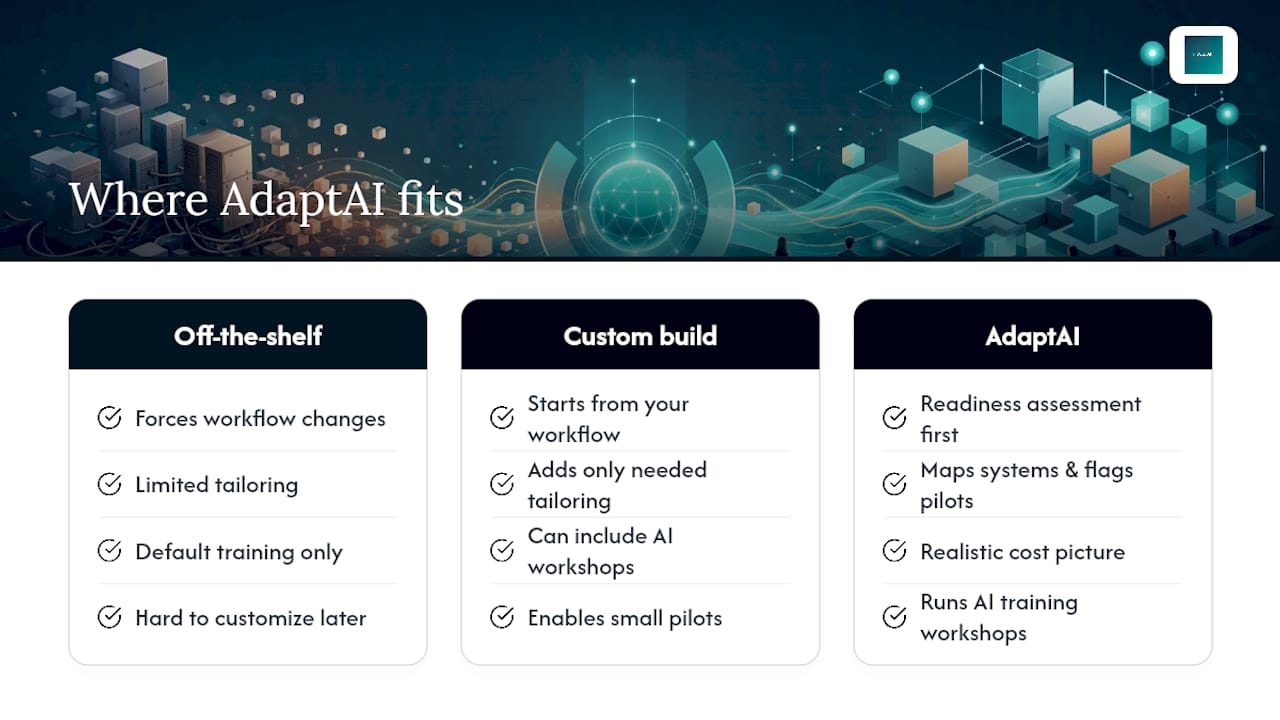
Where off-the-shelf platforms force your workflow to bend around their defaults, a custom software build starts from how your business actually operates and adds only the tailoring you genuinely need, which is the same principle the IEEE framework recommends for any modernization path. Some providers also run AI training workshops alongside the build, so teams know how to use the new system rather than defaulting back to spreadsheets over time.
If you're weighing whether a phased modernization plan makes sense for your operation, a readiness assessment is the low-risk first step. It maps your current systems, flags where a small pilot would pay off fastest, and gives you a realistic cost picture before you commit to anything. Get in touch with AdaptAI to scope your first move.
Sources
For teams that want the primary technical guidance behind this playbook, AWS publishes detailed prescriptive guidance on phased application modernization and a companion wave-based refactoring guide covering dependency sequencing in depth. The IEEE's 2025 transplantability and tailoring framework lays out the academic case for minimal customization. Industry playbooks like TechBullion's 2026 ROI analysis offer current payback benchmarks worth checking against your own business case.
- IEEE transplantability and tailoring framework (2025)
- Legacy application modernization: a 2026 playbook with ROI numbers (TechBullion)
FAQ
Is replacing a legacy system worth it?
It's usually worth it once maintenance costs, security risk, or blocked feature delivery exceed the cost of modernizing, which is why a phased, ROI-tracked approach beats a blanket rebuild decision.
Which is an example of legacy system modernization?
Rehosting an on-premises invoicing application to cloud infrastructure, or replacing an unsupported database engine while keeping the application logic intact, both count as modernization under the 7 Rs framework.
What is a legacy system example?
A legacy system is any application, database, or platform still running critical business functions on outdated technology, common examples include on-premises ERP software, unsupported database versions, and homegrown scheduling tools built decades ago that nobody has fully documented since.
How many companies still use legacy systems?
Exact figures vary by industry and aren't consistently tracked across sectors, but legacy dependency remains common enough that most modernization guidance, including AWS's and IEEE's, assumes organizations are migrating from at least one system built on older, poorly documented architecture.
What's the typical payback period for modernization?
For refactor and replatform paths, expect 14 to 26 months to full payback; rehosting tends to pay back faster, while full rebuilds usually take longer given their larger scope.