
A data migration plan is a documented, phased approach for moving data between systems while guaranteeing three things: zero unrecoverable data loss, a defined downtime window your business has agreed to, and validated proof the target system works before you flip the switch. The right approach almost always combines a phased rollout, a pilot run on a slice of real data, and a rehearsed cutover with a rollback path. Skip any of the three, and you're not migrating data. You're gambling with it.
Table of Contents
- What does a data migration plan actually cover?
- What should every migration plan document contain?
- How do you plan a migration phase by phase?
- How do you validate a migration before going live?
- What does a safe cutover and rollback plan look like?
- What are the biggest risks in a migration and how do you control them?
- How AdaptAI applies this playbook to real consolidation projects
- An honest read on where migration plans usually go wrong
- Get help building and executing your migration plan
- Sources
- FAQ
What does a data migration plan actually cover?
A data migration plan is not a single document. It's a set of decisions about scope, sequencing, and risk tolerance, applied to a specific project. Before you write a single checklist item, you need to know what's in scope: which source systems, which data objects (customers, transactions, historical records), and which downstream integrations depend on that data arriving correctly.
The type of migration you're running shapes everything downstream. A storage migration (moving files or databases to new infrastructure with no structural change) carries lower transformation risk but can still cause outages if bandwidth or timing is misjudged. A database migration (changing database engines or schemas) introduces mapping and compatibility risk. An application migration (retiring one system for another, like moving from spreadsheets into a CRM) is the highest-risk category because it usually combines schema changes, business process changes, and user retraining all at once.
Not every project needs the full framework. A lightweight runbook is enough when you're moving a small, well-understood dataset with no regulatory exposure and generous downtime tolerance. You need the full structured approach when any of these apply:
- The data is regulated (health records, financial data, personal information under privacy law)
- Volume exceeds what you can manually verify (tens of thousands of records or more)
- The business can't tolerate more than a few hours of downtime
- Multiple systems or teams depend on the data being correct on day one
Structured migration frameworks exist precisely because ad hoc migrations tend to skip validation steps under deadline pressure. A framework forces those steps into the schedule instead of leaving them optional.
What should every migration plan document contain?
Before your team writes a line of transformation code, get these seven elements approved in writing. This is the checklist you present to stakeholders for sign-off, and it's the one auditors and future you will thank you for keeping.
- Business objectives and acceptance criteria. State what success looks like in measurable terms, who owns each objective, and who has authority to declare go or no-go.
- Complete data inventory and dependency map. List every source table, file, and integration point, and document what breaks downstream if each one is missing or wrong.
- Data profiling outputs. Run automated profiling to catch null rates, duplicate records, and referential integrity problems before they become someone else's problem at 2 a.m. on cutover night. Gartner's guidance on data quality recommends this step specifically to set measurable migration KPIs, not just to "clean up" data informally.
- Mapping workbook and transformation rules. Every source field needs a documented destination, a transformation rule if formats differ, and a note on what happens to values that don't fit the new schema.
- Validation standards. Define exactly what "correct" means: record counts, checksum thresholds, and business-process tests that prove the data still works, not just that it exists.
- Security, compliance, and residency controls. Lock in encryption in transit and at rest, role-based access for anyone touching the data during migration, and data residency requirements before a single record moves.
- Rollback strategy and hypercare plan. Document the exact conditions that trigger a rollback, how long you'll run parallel support after cutover, and who's on call.
Pro Tip: Build your acceptance criteria and your rollback triggers in the same meeting, with the same stakeholders. Teams that define them separately often end up with acceptance thresholds nobody agreed to abandon if things go sideways.
Miss any of these seven and you'll likely discover the gap mid-project, when it's far more expensive to fix.
How do you plan a migration phase by phase?
Every reliable data migration plan breaks into six phases. Treat each as a work package with named owners and clear exit criteria, not a vague stage on a slide.
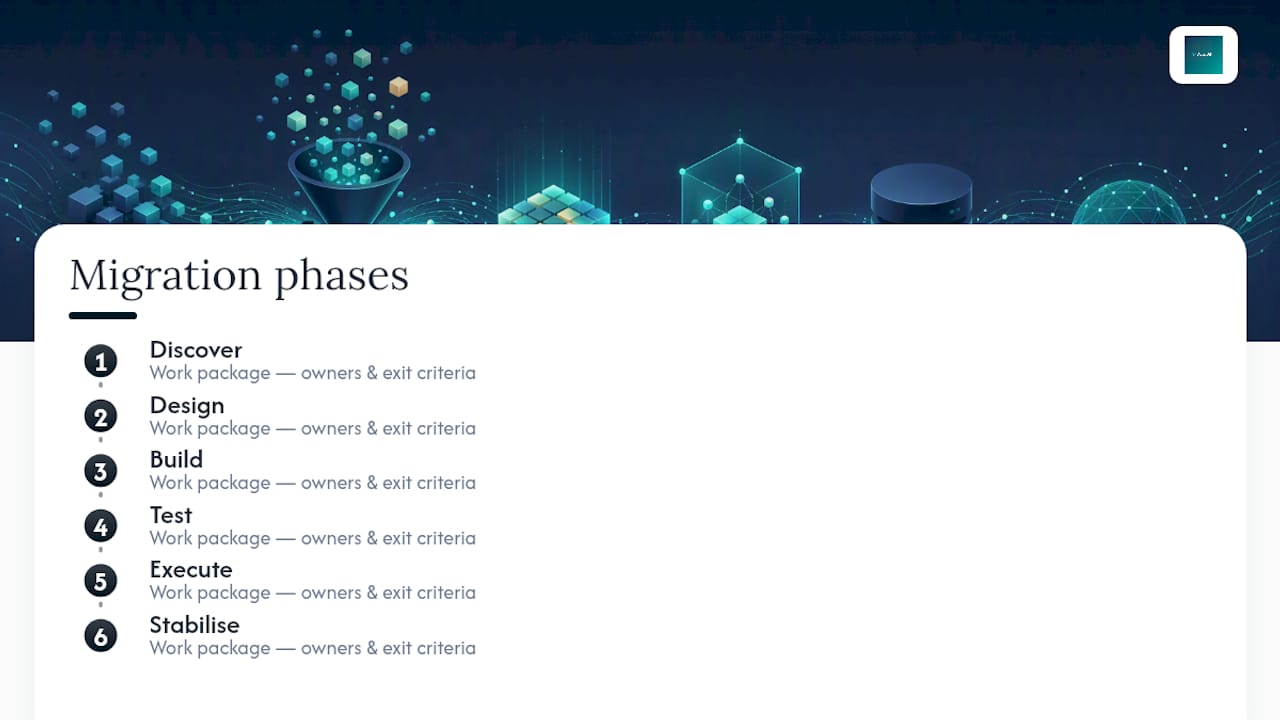
Discover: know what you're actually moving
This phase is where most timeline overruns get baked in, because teams underestimate how messy real production data is. Build a full inventory of source systems, fields, and volumes. Run automated profiling to surface quality issues early, since catching null rates and cardinality problems here costs a fraction of catching them post cutover. Map dependencies between systems, and classify data by sensitivity so your security team knows what needs special handling before design even starts.
Design: decide how data moves and how it's shaped
With discovery complete, define your mapping and transformation rules field by field. Pick your staging architecture and, critically, choose your cutover model. A big-bang migration moves everything in one event, which is simpler to plan but riskier if something fails. A phased migration moves data in stages, spreading risk but requiring the old and new systems to coexist for longer. Many teams also lean on Change Data Capture (CDC) during this phase, which tracks inserts, updates, and deletes on the source system in real time so the target stays synchronized right up until cutover. That's what makes near-zero-downtime cutovers achievable for systems that can't afford an extended freeze.
Build: construct the pipelines and the safety net
This is where transformation logic, staging environments, and logging get built. Instrument everything now. If your validation scripts, error logs, and monitoring dashboards aren't ready before testing starts, testing will surface problems you have no way to diagnose. Build your rollback mechanism here too, not as an afterthought once cutover is already scheduled.
Test: prove it works before it matters
Run a pilot migration on a representative slice of data, typically 5 to 10 percent, chosen specifically to include your ugliest edge cases: complex nested records, sensitive fields, and anything with a history of data quality problems. SAS's guidance on migration planning notes that a well-chosen pilot at this scale tends to surface the bulk of migration issues at a fraction of the cost and time of a full run. Reconcile every pilot record against the source, run performance tests under realistic load, and confirm security controls hold under the new configuration.
Execute: the cutover itself
Freeze changes to the source system according to your documented schedule, run the final data sync, and walk through your go/no-go checklist with named decision makers present, not on call. Nobody should be improvising authority in the middle of a cutover window.
Stabilise: hypercare and closeout
Run heightened monitoring for a defined hypercare period, typically one to four weeks depending on volume and criticality. Decommission old systems only after hypercare confirms stability, and document lessons learned while the details are still fresh.
Pro Tip: Rehearse the cutover phase at least once on a staging environment before the real event. Teams that skip the dry run are the ones who discover their rollback script has a bug during the actual outage window, when it's the worst possible time to find out.
How do you validate a migration before going live?
Validation is where migration plans succeed or quietly fail. A migration that "looks complete" and one that's actually verified are two different things, and the gap between them is where data quality problems hide until a customer or auditor finds them for you.
- Size your pilot deliberately. A 5 to 10 percent sample isn't arbitrary. It should be built to include your most complex schemas, your highest-risk sensitive fields, and any records with known historical quality issues, not just a random slice of easy data.
- Run checksum and record-count reconciliation. Compare row counts and checksum hashes between source and target for every table, not just the ones you expect to be tricky.
- Apply statistical sampling for large tables. When full reconciliation isn't practical at scale, sample statistically significant subsets and extrapolate confidence levels rather than skipping validation on volume alone.
- Run business-process smoke tests. Confirm that a real user workflow, like generating an invoice or pulling a customer record, still produces correct results in the new system, not just that the data technically exists.
- Automate what you can and log everything. Validation scripts should run repeatably and log every discrepancy with enough detail for someone to triage it without rerunning the whole test.
A pilot covering 5 to 10 percent of representative data typically surfaces the majority of migration issues for around a tenth of the cost and time a full migration would take to expose the same problems. That ratio alone should settle any debate about skipping the pilot to save time.
Acceptance criteria need real thresholds attached before testing starts, not after: parity counts within a defined tolerance, checksum matches on every critical table, and named approvers who sign off once those thresholds are met. Redwerk's migration playbook frames this sign-off workflow as a control, not a formality, specifically because vague acceptance criteria are what let broken migrations get approved under deadline pressure.
What does a safe cutover and rollback plan look like?
Your cutover runbook should read like a script, not a plan. Every step gets a time slot and a named owner, so nobody is guessing who's responsible when something goes sideways at 3 a.m.
A typical sequence looks like this:
- T-minus 24 hours: final pre-checks, communications sent to all stakeholders, freeze notice issued to source system users.
- T-minus 1 hour: source system frozen, final CDC sync triggered, monitoring dashboards live.
- Cutover window: final data sync completes, validation scripts run automatically, go/no-go checkpoint with named decision makers.
- Post-cutover: smoke tests on critical business processes, extended monitoring begins, stakeholders notified of completion or rollback.
Go/no-go criteria need to be decided in advance, not improvised in the moment. Technical triggers might include checksum mismatches above a set tolerance or failed reconciliation on a critical table. Business triggers might include a key process failing its smoke test, regardless of what the technical metrics say. Either type of trigger should be enough on its own to pull the rollback lever.
Communication during the window matters as much as the technical steps. Stakeholders need a single source of truth for status updates, and an escalation path that doesn't require finding the one engineer who understands the rollback script. After cutover, verify your recovery time objective (RTO) and recovery point objective (RPO) were actually met, not just assumed. If your target RPO was fifteen minutes of data loss tolerance and your CDC lag was forty, that's a finding worth documenting even if the migration otherwise succeeded.
What are the biggest risks in a migration and how do you control them?
Most migration failures trace back to the same handful of causes, and each has a known control.
- Data loss or corruption. Mitigate with checksums on every critical table, dual validation (automated plus manual spot checks), and staged rollouts that limit the blast radius of any single failure.
- Extended downtime. Reduce exposure with CDC, phased migration, or a parallel run where the old and new systems operate side by side until confidence is high. Phased approaches with CDC are specifically built to keep source and target synchronized so cutover windows shrink.
- Security and privacy gaps. Encrypt data in transit and at rest, apply role-based access control to anyone touching the migration pipeline, and mask sensitive fields in any test or staging environment.
- Performance and integration surprises. Rehearse with realistic production-scale workloads, not sample datasets that behave nothing like real traffic, and build buffer time into the schedule for the surprises rehearsal doesn't catch.
A broader pattern worth naming is this: ten recurring risk categories, including data loss, schema errors, and compliance violations, show up across most failed migrations, and the common thread is that none of them were caught because nobody built a control for them before data started moving.
Pro Tip: If your migration touches regulated data, bring your compliance and security owners into the discovery phase, not the testing phase. Retrofitting compliance sign-off after the mapping is already built usually means redoing the mapping.
How AdaptAI applies this playbook to real consolidation projects
Most small and medium businesses aren't migrating a data warehouse. They're consolidating years of spreadsheets, a standalone invoicing tool, and a separate scheduling app into one connected system, which is its own version of a spreadsheet to database migration and comes with its own version of every risk above.
Custom software that merges CRM, invoicing, scheduling, and reporting behind a single login typically starts with discovery discipline including full inventory of existing spreadsheets and tools, a dependency map of critical fields, and a pilot migration before going live.
- Migration and integration engineering built around each business's actual data, not a generic template
- Automated validation and reconciliation checks before a full team transition
- Post-migration training so staff actually use the new system correctly from day one
- Ongoing monitoring and support rather than a handoff-and-disappear engagement
Clients who go through this kind of consolidation may report saving administrative work hours per week once the migration is complete and the team is trained on the new system. That range reflects how much manual reconciliation and duplicate data entry a scattered toolset creates in the first place.
An honest read on where migration plans usually go wrong
Most migration guidance obsesses over tools. Pick the right platform, the thinking goes, and the migration mostly takes care of itself. That's backwards. The research is fairly consistent on this: a structured framework that governs validation, rollback rules, and sign-off authority matters more than which vendor's migration service you pick, because the framework is what decides whether problems get caught in a pilot or discovered by a customer three weeks after go-live.
The most underrated line item in any migration plan isn't the mapping workbook. It's the rollback trigger definition, written down and agreed to before anyone is under pressure to hit a deadline. Teams that skip this step don't skip it because they're careless. They skip it because agreeing on failure conditions feels like planning for pessimism when everyone wants to believe the migration will go smoothly. It rarely does on the first attempt at full scale, which is exactly why the pilot exists.
If you take one thing from this playbook, take the pilot. A small, deliberately ugly sample of your worst data will tell you more about your migration's real risk than any amount of planning meetings. Everything else, the mapping rules, the cutover script, the hypercare schedule, exists to act on what the pilot reveals.
— Harry Gill
Get help building and executing your migration plan
An alternative to hiring a generalist IT contractor or using generic out-of-the-box migration templates is a service that builds migration engineering, automation, and training around your actual data and processes, with ownership of the resulting code and no lock-in.
A typical engagement starts with a discovery phase mapping your current systems and data, moves into a pilot migration on a representative slice of your data, and finishes with a validated cutover and hands-on team training so staff use the new system correctly from week one. Ongoing support and AI-driven reporting keep the data reconciled long after go-live, and workflow automation can handle the reconciliation checks that would otherwise eat your team's time.
If your business is running on a patchwork of spreadsheets, invoicing software, and scheduling tools that don't talk to each other, start with a conversation about what a custom-built consolidation could look like for your data and your timeline.
Sources
- How to improve your data quality | Gartner
- Data migration for project leaders: a guidebook | SAS (whitepaper)
- Data migration best practices: a six-phase playbook for enterprise moves | Redwerk
FAQ
Can you give me an example of a data migration?
A common example is a small business moving customer records from spreadsheets and a separate invoicing tool into one CRM. The plan would inventory every spreadsheet column, map each field to the CRM's schema, pilot the migration on a sample of customers, and validate record counts before the full team switches over.
Which tool is best for data migration?
There's no single best tool. The choice depends on your source and target systems: cloud vendor services like Azure Database Migration Service handle database engine conversions well, while a spreadsheet to database migration or excel to CRM migration usually needs custom mapping and transformation logic built around your specific fields, which is where a tailored build often outperforms a generic tool.
How do I manage a data migration?
Manage it as a phased project with named owners for discovery, design, build, test, execute, and stabilise, each with defined exit criteria. The two controls that matter most are running a pilot migration on 5 to 10 percent of your data before the full move, and defining rollback triggers before cutover, not during it.
Can you provide a sample data migration plan?
A sample plan should include a data inventory, a mapping workbook, a pilot test on representative data, documented acceptance criteria with checksum and record-count thresholds, a cutover runbook with go/no-go checkpoints, and a hypercare period after go-live. AdaptAI builds this structure into every custom consolidation project for small and medium businesses.