
For most small businesses, the smart move is a no-code or hybrid client portal, not a from-scratch build. Configure a platform for authentication, file sharing, and status updates first, then hire a specialist only for the pieces no platform can handle. Pick one friction-heavy workflow, like client onboarding or approvals, and automate that first.
Table of Contents
- How do you decide whether to build, buy, or go hybrid?
- What features actually belong in your first version?
- What security and maintenance commitments come with a client portal?
- Which integrations should you connect first?
- What should you budget for time and cost?
- What does an 8 to 12 week MVP roadmap look like?
- Why does hiring an experienced vendor change the outcome?
- Where do most portal projects actually go wrong?
- How AdaptAI approaches a client portal build
- Sources
- FAQ
How do you decide whether to build, buy, or go hybrid?
The decision comes down to five factors: timeline, budget, how unusual your workflows are, who maintains the thing after launch, and whether you handle regulated data. Score yourself honestly on each before committing to a direction.
Buy a platform when:
- You need something running in weeks, not months
- Your workflows look like everyone else's (file sharing, approvals, status updates)
- You don't have spare developer hours for ongoing upkeep
- Predictable monthly cost matters more than owning the code
Build custom when:
- The portal is your product, not a support tool around it
- You need deep integrations with legacy systems that no platform vendor has built connectors for
- Your workflow logic is genuinely unusual, not just "our spreadsheet is messy"
This is often the sweet spot for growing businesses. Buy-versus-build research consistently shows that purchasing a purpose-built portal costs far less in year one and over three years than building from scratch, and buyer guides recommend most service firms buy unless their workflow is uniquely differentiating or they already run a software team with room to spare.
Quick self-check: if you answered "buy" to three or more of the criteria above, start there. If your reasons for building all trace back to one unusual process, isolate that piece and consider custom software built around that specific gap instead of rebuilding everything from zero.
What features actually belong in your first version?
Skip the feature wish list. A client portal earns its keep with five things, and everything else is a distraction until you've proven the basics work.
- Authentication: magic links are faster to set up and friendlier for non-technical clients than passwords; add multi-factor authentication for anything touching financial or personal data, and consider single sign-on only once you have enough enterprise clients to justify it.
- Record-level permissions: role-based access control so a client sees only their own files and data, never a peer's.
- Secure file exchange: upload size limits, automatic virus scanning, and encryption on anything moving in or out.
- Workflow basics: approvals, status updates, notifications, and an audit trail showing who did what and when.
- Onboarding flow: an invite email, a short first-run checklist, and plain-language guidance so clients don't need a support call to log in.
Pro Tip: Resist the urge to add a messaging system, a billing dashboard, and a document editor all in the MVP. Digital-product strategists consistently warn that feature creep is what kills portal projects before they ever get adopted. Ship the thinnest version that solves one real problem, then let usage data tell you what to add next.
No-code platforms have gotten good enough that you can assemble authentication, data views, and file uploads in a matter of days, which makes "start thin" a realistic plan rather than a compromise.
What security and maintenance commitments come with a client portal?
A portal isn't a launch-and-forget project. Software libraries go out of date, browsers change how they handle cookies and permissions, and every one of those shifts is a potential crack in your client's data security. Budget real hours for this every month, not just at launch.
Non-negotiable security controls:
- TLS encryption for everything in transit
- Encryption at rest for stored files and records
- Multi-factor authentication, at minimum for admin accounts
- Audit logs that record access and changes
- A clean way to revoke access immediately when a client relationship ends
Ongoing operational tasks:
- Automated backups, tested periodically (a backup you've never restored is a guess, not a plan)
- Uptime and error monitoring
- A documented incident response plan, even a simple one
- Periodic security review or penetration testing, especially once you're handling financial or health data
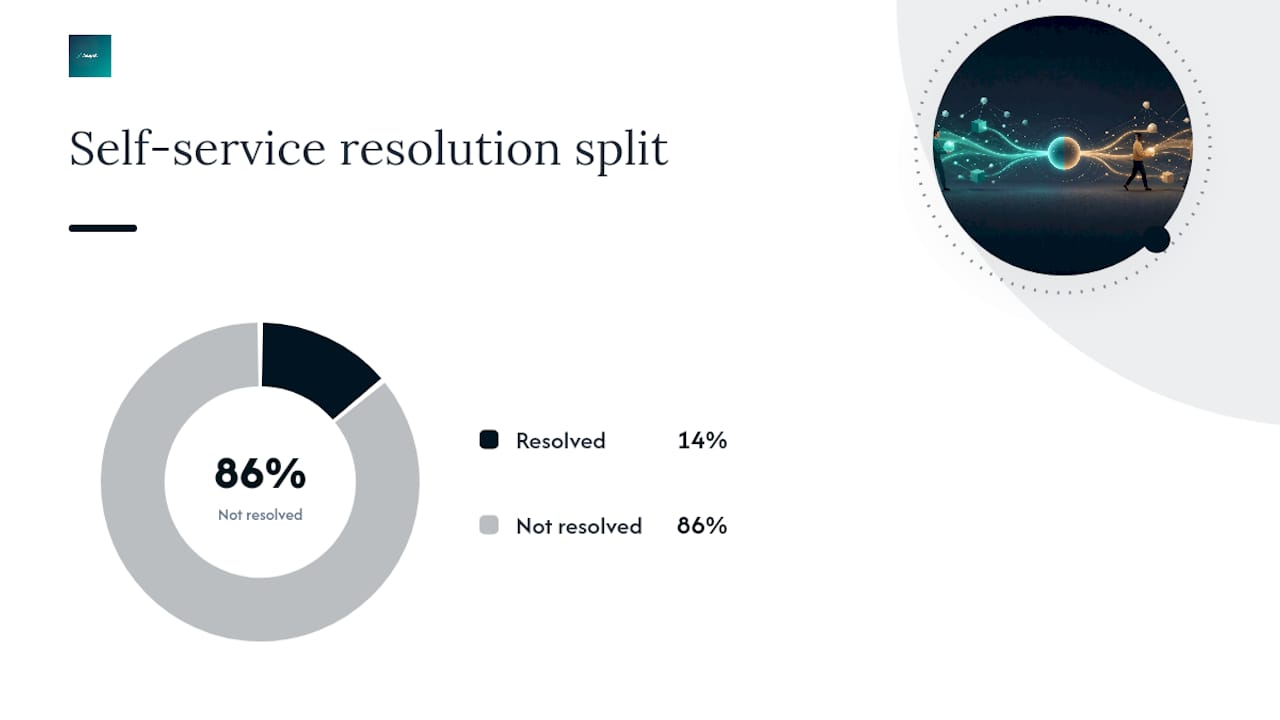
Here's the uncomfortable number worth sitting with: Gartner found that only 14% of customer service issues are fully resolved through self-service. That's not an argument against building a portal. It's an argument for treating design, integration, and maintenance as ongoing work rather than a one-time project. A portal that isn't maintained will quietly become a source of support tickets instead of a way to reduce them.
Which integrations should you connect first?
Not every system deserves a live connection on day one. Rank by value and risk, and start with the ones that touch client-facing data most often.
High-value first connections:
- CRM, so client records don't live in two places
- Accounting or invoicing, for status visibility without duplicate entry
- Scheduling, if appointments or deliverables are part of the client relationship
- E-signature and document storage, for approvals and file history
Before connecting anything, clean your data. Normalize company and contact records, remove duplicates, and map IDs across systems so a client in your CRM matches the same client in your accounting software. Skipping this step is one of the most common ways portal projects fail after launch, usually through broken permissions or records that don't sync.
For your MVP, favour read-only or single-direction syncs over full two-way integration. A webhook that pushes status updates outward is lower risk than a live two-way sync that can silently corrupt records on both ends.
What should you budget for time and cost?
A no-code pilot can go live in days to a few weeks if your workflow is simple and your data is already clean. That's the fastest path to seeing whether clients will actually use the thing.
A custom MVP is a different timeline: realistically 8 to 12 weeks for a working first version, and projects that promise shorter timelines usually cut corners on testing or data prep, which shows up later as bugs or security gaps.
Ballpark cost ranges:
- Subscription platform: a modest monthly fee stacked over a year, usually far below custom build totals
- Custom-built portal: a larger upfront project cost, offset over time by owning the system outright
- Ongoing maintenance: budget part-time developer or vendor hours every month, regardless of which path you choose
Don't forget the costs that don't show up in a quote: security monitoring, periodic review, client support during rollout, and any data migration from your old tools. Buy-versus-build research is consistent on this point. Buying typically costs less in year one and over three years than a custom build for most small service businesses, which is exactly why hybrid is the default recommendation here.
What does an 8 to 12 week MVP roadmap look like?
- Phase 0 (before week 1): Pick the single workflow causing the most friction right now, whether that's client onboarding, document approvals, or status checks. Name one person as the project owner.
- Weeks 1 to 2: Discovery. Map your data fields, define permission rules, and clean up duplicate or inconsistent client records before anything gets connected.
- Weeks 3 to 6: Configure integrations, build the core screens, and set up authentication. This is where the bulk of the build work happens.
- Weeks 7 to 8: Test with real clients, not just your team. Fix what breaks, and run through your security checklist before anyone outside the pilot group gets access.
- Weeks 9 to 12: Launch to your pilot group, watch adoption numbers, and iterate based on what people actually use.
Pro Tip: Treat weeks 1 and 2 as the most important phase, not the fastest one to rush through. Data cleaning before integration prevents the broken permissions and privacy incidents that tend to surface right after launch, when it's hardest to fix quietly.
Why does hiring an experienced vendor change the outcome?
A vendor who's built portals before brings pattern recognition you can't buy from a template. At AdaptAI, we build custom systems that connect CRM, invoicing, scheduling, and reporting behind one login, and we pair every build with hands-on AI training so your team actually uses what gets delivered instead of falling back on old habits. Clients typically report saving 5 to 15 hours of administrative work per week after implementation, a useful benchmark whether you hire us or someone else.
Before signing with any vendor, ask these questions:
- What's the service level agreement for uptime and support response?
- Who maintains the system after launch, and what does that cost monthly?
- Who owns the data and code once the project ends?
- How often is security tested, and by whom?
- Does the engagement include training so my team can actually run this?
Vague answers to any of these are worth treating as a red flag.
Where do most portal projects actually go wrong?
Feature creep kills more portal projects than bad code ever does. Every stakeholder wants "just one more thing" before launch, and each addition delays the moment you find out whether clients will use it at all. Start thin, measure real adoption, then expand.
Data cleanliness isn't optional prep work you can skip under deadline pressure. Broken permissions and privacy incidents almost always trace back to messy records that never got normalized before integration. And maintenance needs an owner and a monthly budget from day one, not a promise to "figure it out later" as explained in Meddle's ongoing maintenance and operational practices. Projects without a named owner degrade quietly until a client notices something's broken.
— Harry Gill
How AdaptAI approaches a client portal build
AdaptAI is the alternative to guessing your way through a no-code platform or gambling on a freelancer who disappears after launch: a fixed-price, scoped engagement where you know the cost and timeline before work starts, and where training is part of the deal, not an afterthought.
Our engagements typically start with a scoping conversation to figure out whether your situation calls for a custom build or a smarter configuration of existing tools, then move into a fixed-price project with a clear delivery window. We also handle the integrations that connect CRM, invoicing, and scheduling behind one login, so your team stops re-entering the same client data three times a day. If cost planning is where you're stuck, our guide to custom software pricing breaks down what a realistic engagement looks like for a business your size.
If you're ready to see what a scoped, fixed-price proposal looks like for your specific workflow, request a discovery conversation with our team and find out where a portal would save you the most hours.
Sources
- What is feature creep? — Dovetail
- Gartner: 14% of customer service issues fully resolved in self-service (press release)
- How to build a customer portal — Retool blog
- Common reasons projects fail — ReqTest knowledgebase
- Build vs Buy a Client Portal — OnboardMap
FAQ
How do I create my own client portal?
Start by choosing one workflow to automate, like client onboarding or file approvals, then configure a no-code platform to handle authentication, permissions, and file exchange for that single workflow before adding anything else.
What is a client portal?
A client portal is a secure, self-service login area where clients can view their files, check project status, submit approvals, and communicate with your business without emailing back and forth or waiting on a phone call.
What is the best client portal solution?
The best option depends on your workflow: standard needs are usually served well by a configured no-code platform, while businesses with unique processes or deep legacy integrations often get more long-term value from a custom build like the ones AdaptAI delivers.
How much does a client portal typically cost?
A no-code subscription platform usually costs far less in year one than a custom build, while a custom MVP is a larger upfront investment that typically pays off through ownership and tighter integration over time; AdaptAI's custom software cost guide breaks down realistic ranges for small business budgets.